Stores app settings about how to connect and interact with Kanda Cloud services. More...
 Inheritance diagram for ICloudSettings: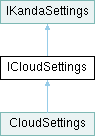
Properties | |
| DeploymentEnvVar< string > | EnvironmentName [get] |
| The name of each deployment environment in Kanda Cloud. This is prepended to ApiHostname for non-production environments. | |
| string | CustomerIdentifier [get] |
| The primary identifier for the API. Use "app" for public cloud, or a customer identifier for private clouds. This is prepended to ApiHostname. | |
| string | ApiHostname [get] |
| The hostname for the API. | |
| string | ApiVersion [get] |
| The version of the API to target. This is appended to ApiHostname. | |
| string | AppIdentifier [get] |
| A secondary identifier for the app itself. This can be used when multiple apps target the same API and tenant but wish to filter data based on the application. | |
| string | LoginHostname [get] |
| The hostname for the login page for use in device code auth flows. | |
| DeploymentEnvVar< string > | OidcClientId [get] |
| The OpenID Connect scopes to request when logging in. | |
| string | OidcScopes [get] |
| The OpenID Connect client ID specifies which OAuth client to use at login. | |
| string | OidcDeviceCodeGrantType [get] |
| The OpenID Connect grant type to use for Device Code login flows. | |
| string | OidcRefreshTokenGrantType [get] |
| The OpenID Connect grant type to use for refresh tokens. | |
| string | OidcDeviceCodeRoute [get] |
| The route to use for initiating Device Code login flows. This is appended to LoginHostname. | |
| string | OidcCodeActivationRoute [get] |
| The route to use for Device Code activation. This is appended to LoginHostname. | |
| string | OidcTokenRoute [get] |
| The route to use for obtaining OpenID Connect tokens. This is appended to LoginHostname. | |
Detailed Description
Property Documentation
◆ ApiHostname
|
get |
The hostname for the API.
Implemented in CloudSettings.
◆ ApiVersion
|
get |
The version of the API to target. This is appended to ApiHostname.
Implemented in CloudSettings.
◆ AppIdentifier
|
get |
A secondary identifier for the app itself. This can be used when multiple apps target the same API and tenant but wish to filter data based on the application.
Implemented in CloudSettings.
◆ CustomerIdentifier
|
get |
The primary identifier for the API. Use "app" for public cloud, or a customer identifier for private clouds. This is prepended to ApiHostname.
Implemented in CloudSettings.
◆ EnvironmentName
|
get |
The name of each deployment environment in Kanda Cloud. This is prepended to ApiHostname for non-production environments.
Implemented in CloudSettings.
◆ LoginHostname
|
get |
The hostname for the login page for use in device code auth flows.
Implemented in CloudSettings.
◆ OidcClientId
|
get |
The OpenID Connect scopes to request when logging in.
Implemented in CloudSettings.
◆ OidcCodeActivationRoute
|
get |
The route to use for Device Code activation. This is appended to LoginHostname.
Implemented in CloudSettings.
◆ OidcDeviceCodeGrantType
|
get |
The OpenID Connect grant type to use for Device Code login flows.
Implemented in CloudSettings.
◆ OidcDeviceCodeRoute
|
get |
The route to use for initiating Device Code login flows. This is appended to LoginHostname.
Implemented in CloudSettings.
◆ OidcRefreshTokenGrantType
|
get |
The OpenID Connect grant type to use for refresh tokens.
Implemented in CloudSettings.
◆ OidcScopes
|
get |
The OpenID Connect client ID specifies which OAuth client to use at login.
Implemented in CloudSettings.
◆ OidcTokenRoute
|
get |
The route to use for obtaining OpenID Connect tokens. This is appended to LoginHostname.
Implemented in CloudSettings.
The documentation for this interface was generated from the following file:
- Runtime/Settings/App/CloudSettings.cs